

For UK quantity surveyors
Estimation software that shows its working
Takeoff, NRM2 bills, tender, valuations and final account in one system. Every quantity opens the measurement it came from, and every rate names the library version it was priced on.
14 days. No card required. UK data residency.
NRM2 and NRM3
The standard method throughout.
UK data residency
Project data is held in the UK.
Immutable audit trail
Recorded as it happens, not editable after.
Built by practising QSs
Written by people who still price work.
Exports you own
Excel, CITE, BCIS, NBS, IFC, MS Project.
Four screens, one set of numbers
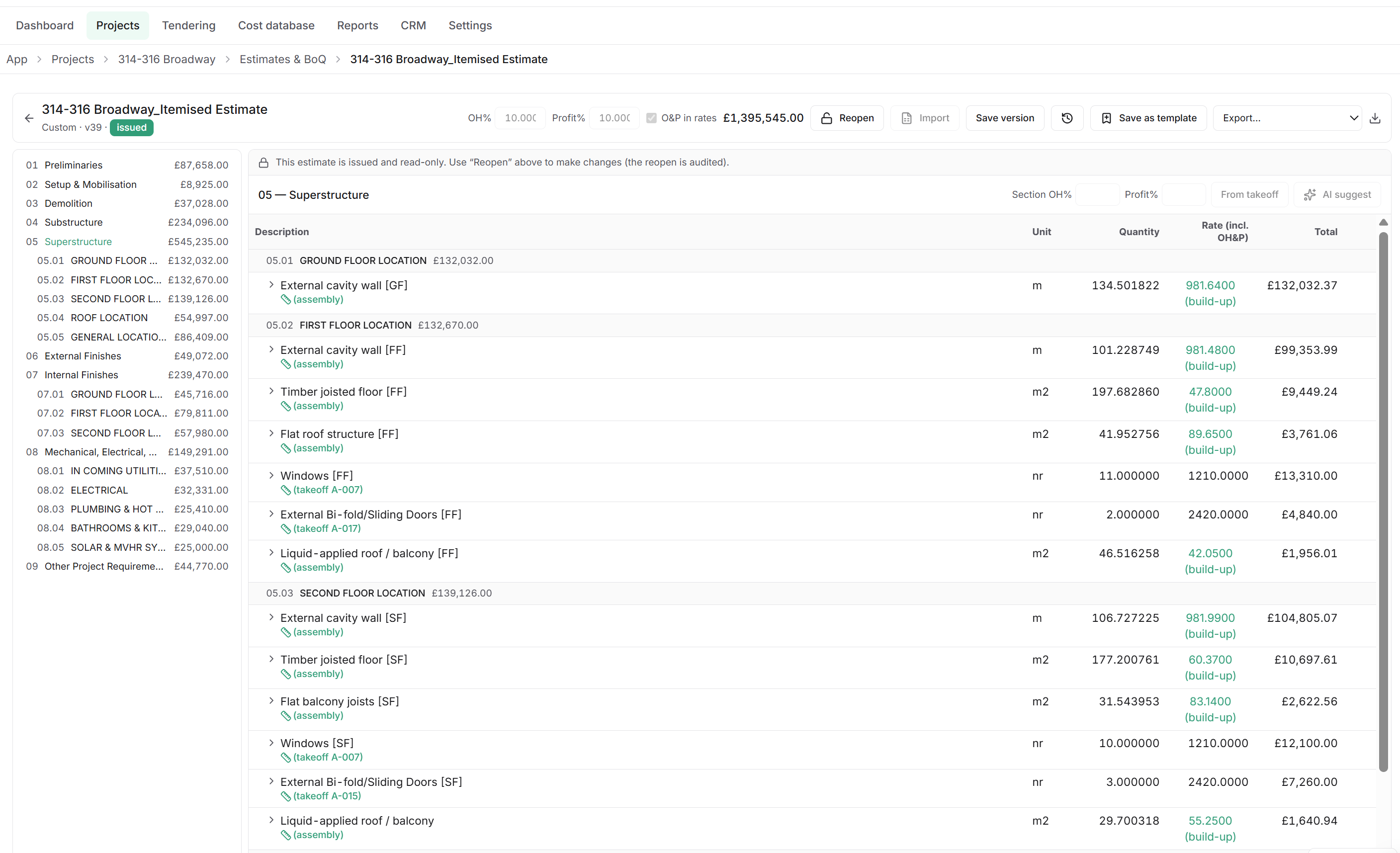
Nothing here is a mock-up. These are the working screens, and the quantities in each come from the measurement in the first.
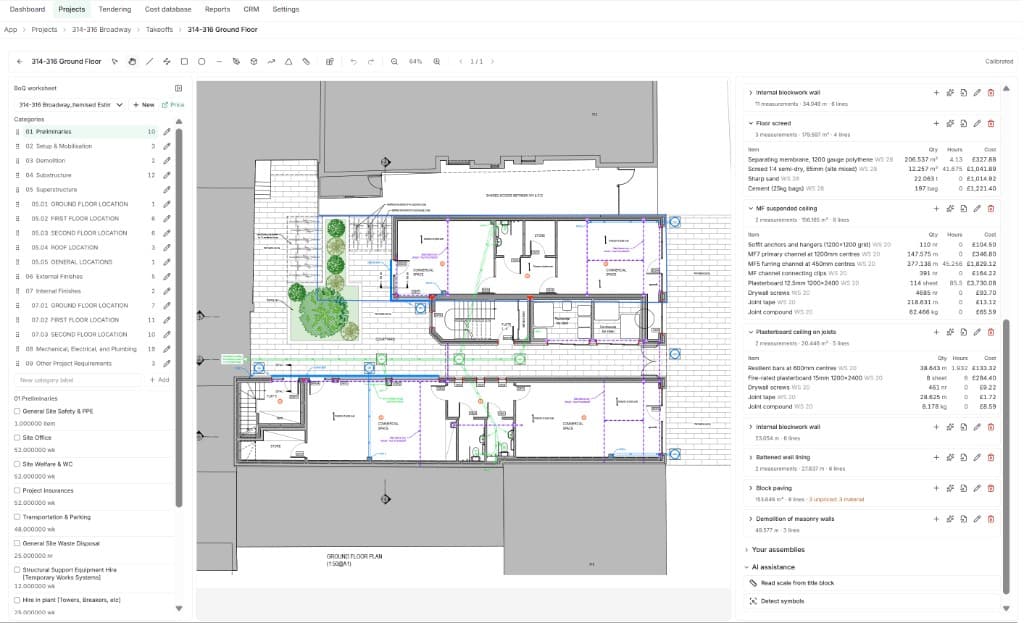
Measure on the PDF with linear, area, count and assembly tools. Scale is calibrated from the title block and recorded against the sheet and revision.
Ground floor · rev 02 · 1:50
Watch it work
Live figures · reduced motion renders the finished frame
A drawing measuring itself, a bill section pricing up, and a programme building from that estimate with earned value drawn against it. The movement is the product working, not decoration.
Takeoff. Measured on the drawing, quantified into a live ledger.
Bill of quantities. An NRM2 section pricing itself up, totals in step.
Programme. Built from the estimate, tracked on earned value.
Who it is for
Principal of a practice
One system your firm can be audited on
Every estimate your name goes on carries its own evidence. Rates, overrides and client decisions are recorded, so a challenge months later is a lookup rather than an investigation.
Senior QS or estimator
Measure once, and stop re-keying
Takeoff feeds the bill directly. No exporting to a spreadsheet, no reconciling two versions of the same quantity, and the measurement is still there when the drawing is revised.
Commercial manager
Value against the bill you issued
Interim valuations, variations and final accounts run off the same bill and the same pricing engine, so the report you send out and the screen you are looking at always agree.
Building contractor
Price the work you are tendering for
Take off the client's drawings, price against your own rates rather than a published list, and keep the build-up behind each figure when the negotiation starts.
Sub-contractor
Return a package you can stand behind
Measure your own scope from the tender drawings, price it to your assemblies, and answer queries on quantities with the measurement rather than a recollection.
Client-side project manager
Review an estimate without a spreadsheet
Read the issued estimate in a portal carrying the firm's branding, comment on a line, accept it or request a change — and every one of those decisions is on the record.
How estimating usually runs, and how it runs here
Most firms run a drawing tool, a spreadsheet and a rate list that do not know about each other. Every hand-off between them is a place where a quantity is retyped, a rate drifts, or the reason behind a figure is lost. None of those hand-offs exist here.
Measurement
Usually
Marked up on the PDF, then typed into a sheet.
Quantifiable
Measured once on the drawing and carried straight into the bill line.
Drawing revisions
Usually
Re-measured from scratch, and the old markup is orphaned.
Quantifiable
The sheet and revision measured are recorded against the quantity.
Assemblies
Usually
Rebuilt by hand on every job.
Quantifiable
One measurement applies a whole build-up, to your firm's assemblies.
AI assistance
Usually
None, or a suggestion you cannot check.
Quantifiable
Suggestions with confidence shown, accepted or rejected line by line.
Rates
Usually
A list copied per job, which drifts from the last one.
Quantifiable
A maintained UK library with your overrides, versioned.
Overheads and profit
Usually
A percentage applied at the bottom of the sheet.
Quantifiable
Set at project, section or line level, and visible in the rate.
Versions
Usually
Filenames ending in final, final-2, final-rev-C.
Quantifiable
Issued versions kept as issued, with their references intact.
Tender
Usually
Packages emailed out and returns sitting in an inbox.
Quantifiable
Sealed packages, named tenderers, issue and open events logged.
Client decisions
Usually
In an email thread somebody has to find.
Quantifiable
Recorded in the portal as they are made, against the line.
Valuation
Usually
Rebuilt from whichever copy of the bill was sent.
Quantifiable
Valued directly against the bill you issued.
Variations
Usually
Priced on the side and reconciled later.
Quantifiable
Priced against the bill line they came from, on JCT and NEC terms.
Programme and EVM
Usually
A separate programme, typed up from the estimate.
Quantifiable
Generated from the priced work and tracked on CPI, SPI and EAC.
Reports
Usually
Assembled by hand, and out of date on arrival.
Quantifiable
Generated from the same pricing engine as the screen.
Audit trail
Usually
Whatever the file history happens to show.
Quantifiable
Every override, approval and issue written immutably as it happens.
Exports
Usually
Copy, paste and reformat.
Quantifiable
Excel, PDF, CITE, BCIS, NBS, IFC and Microsoft Project.
One source of quantities
Measured once, then used by the bill, the tender, the valuation and the final account.
One source of rates
A versioned library with your firm's overrides, so an estimate issued last year still prices as issued.
One record of decisions
Every override, approval and client decision written as it happened, and not editable after.
Your first week
Switching estimating software is the real cost, so the trial is built to be done on a live job rather than on a sample.
Day 1
Create the workspace
No card. Invite the team, or work alone until you are satisfied.
Day 1–2
Bring your rates in
Start from the starter library the workspace ships with, or bulk import your firm's own rates and let them override it.
Day 2–4
Take off a real drawing
Upload the PDF, calibrate the scale, and measure a section you have already priced elsewhere. Compare the two.
Day 5
Issue the bill
Issue to the portal or export to Excel, CITE or NBS. If you stop there, the workspace goes read-only and stays exportable.
Security and data
Written out in full rather than summarised in a badge. The security overview and the AI data-usage statement are published, not on request.
Read the security overviewHeld in the UK
Your project data and documents stay in the United Kingdom.
Firms are isolated
One firm's workspace cannot see another's, and data is encrypted in transit and at rest.
Recorded immutably
Overrides, approvals, issues and client decisions are written as they happen and cannot be edited afterwards.
What the models see
The AI data-usage statement sets out what is sent, what is not, and what is never used for training.
Questions firms ask
- Can I defend a figure a client challenges?
- Each quantity opens the measurement it came from, and each rate names its build-up and the library version it was priced on.
- Does the AI price the job on its own?
- No. It suggests with confidence shown; a surveyor accepts or rejects every line, and the record shows who accepted what.
- What happens to our work if we leave?
- It comes with you — Excel, PDF, CITE, BCIS, NBS, IFC and Microsoft Project, at any time.
- Can we bring our own rates?
- Yes. Bulk import your firm's rates and they override the maintained library wherever you set them.
- Is there a per-project charge?
- No. One plan, priced per seat, with unlimited projects and documents.
- Does it cover post-contract?
- Interim valuations, variations and final accounts on JCT and NEC terms, plus programme and earned value.
One plan. Every feature from the first seat.
Graduated per seat, so the more of your team you bring the less each seat costs. Billed monthly or annually, ex VAT. Annual billing takes 17% off.
Request beta accessSeats 1–5
£44.99seat / month
Seats 6–9
£34.99seat / month
Seats 10–15
£24.99seat / month
Price your next tender end to end, free for 14 days
Create a workspace, bring your rates, and take a real drawing to an issued bill. No card required.